
开源湖仓一体平台三Arctic下篇
 ckckck2025年1月10日9 浏览
此处 FlinkCDC 同步 MySQL 数据变更到 Arctic 使用的是 lakehouse-benchmark-ingestion 工具完成数据通过 Binlog 从 MySQL 到 Arctic 的同步。
Step 1: Initialize Tables
通过以下命令完成测试数据的初始化:
bash
docker exec -it lakehouse-benchmark java
  -jar lakehouse-benchmark.jar -b tpcc,chbenchmark
  -c config/mysql/sample_chbenchmark_config.xml
  --create=true --load=true
Step 2: Start Streaming Ingestion
在命令行中输入以下指令完成 Ingestion 任务的启动:
bash
docker exec -it lakehouse-benchmark-ingestion java
  -jar lakehouse-benchmark-ingestion-1.0-SNAPSHOT.jar
  -confDir /usr/lib/lakehouse_benchmark_ingestion/conf
  -sinkType arctic
  -sinkDatabase oltpbench
该任务会启动一个 Flink cluster 将 oltpbench 数据库实时同步到指定的 demo_catalog 中,并自动创建同名 database 和 table。开启后可以在 AMS Tables 页面查看到 Table 信息已经同步到 Arctic,这时表中只有初始化后的数据,可以通过 Terminal 执行 SQL 查询 Arctic 上同步的存量数据。
可以通过 Flink Dashboard 访问 Flink Web UI 查看 Ingestion 任务信息。
Step 3: Start TPCC Benchmark
打开一个新的命令行,复制以下指令可以持续在测试库上执行 TPCC 测试:
bash
docker exec -it lakehouse-benchmark java
  -jar lakehouse-benchmark.jar -b tpcc,chbenchmark
  -c config/mysql/sample_chbenchmark_config.xml
  --execute=true
此命令会一直不断的在测试库上执行 OLTP 操作,直到程序退出。在 TPCC 执行过程中,可以回到 Arctic Dashboard 的 Terminal 页面,通过 Spark SQL 查询到 MySQL 上的数据变更会随着 Ingestion 任务不断的同步到 Arctic Table 上。
Ingestion 任务的 Checkpoint 周期为 60s,所以 Arctic 数据湖和 MySQL 的数据变更有 60s 的延迟。
同步核心代码
java
import com.netease.arctic.benchmark.ingestion.config.CatalogConfigUtil;
import com.netease.arctic.benchmark.ingestion.params.CallContext;
import com.netease.arctic.benchmark.ingestion.params.ParameterUtil;
import com.netease.arctic.benchmark.ingestion.params.database.BaseParameters;
import org.apache.commons.cli.CommandLine;
import org.apache.commons.cli.CommandLineParser;
import org.apache.commons.cli.DefaultParser;
import org.apache.commons.cli.Option;
import org.apache.commons.cli.Options;
import org.apache.commons.cli.ParseException;
import org.apache.flink.api.java.utils.ParameterTool;
import org.apache.flink.configuration.Configuration;
import org.apache.flink.configuration.IllegalConfigurationException;
import org.apache.flink.configuration.RestOptions;
import org.apache.flink.runtime.state.filesystem.FsStateBackend;
import org.apache.flink.streaming.api.environment.StreamExecutionEnvironment;
import org.apache.flink.table.api.bridge.java.StreamTableEnvironment;
import org.apache.flink.table.api.bridge.java.internal.StreamTableEnvironmentImpl;
import org.apache.flink.table.operations.Operation;
import org.apache.flink.table.operations.ddl.CreateCatalogOperation;
import org.slf4j.Logger;
import org.slf4j.LoggerFactory;

import java.io.BufferedReader;
import java.io.File;
import java.io.IOException;
import java.io.InputStream;
import java.io.InputStreamReader;
import java.lang.reflect.Constructor;
import java.lang.reflect.InvocationTargetException;
import java.net.URISyntaxException;
import java.nio.file.Files;
import java.util.HashMap;
import java.util.Map;
import java.util.function.Consumer;

import lombok.extern.slf4j.Slf4j;

@Slf4j
public class MainRunner {
    private static final Logger LOG = LoggerFactory.getLogger(MainRunner.class);
    private static StreamExecutionEnvironment env;
    private static StreamTableEnvironment tableEnv;
    public static final String EDUARD_CONF_FILENAME = "ingestion-conf.yaml";

    public static void main(String[] args) throws ClassNotFoundException, InstantiationException,
            IllegalAccessException, URISyntaxException, IOException {
        Class.forName("com.mysql.jdbc.Driver");
        String[] params = parseParams(args);
        String confDir = params[0];
        String sinkType = params[1];
        String sinkDatabase = params[2];
        int restPort = Integer.parseInt(params[3]);
        Map<String, String> props = new HashMap<>();
        Configuration configuration = loadConfiguration(confDir, props);
        BaseParameters baseParameters = new BaseParameters(configuration, sinkType, sinkDatabase);
        if (!baseParameters.getHadoopUserName().isEmpty()) {
            System.setProperty("HADOOP_USER_NAME", baseParameters.getHadoopUserName());
        }
        env = StreamExecutionEnvironment.getExecutionEnvironment(setFlinkConf(restPort));
        env.setStateBackend(new FsStateBackend("file:///tmp/benchmark-ingestion"));
        env.getCheckpointConfig().setCheckpointInterval(60 * 1000L);
        env.getCheckpointConfig().setCheckpointTimeout(1200 * 1000L);
        env.getCheckpointConfig().setTolerableCheckpointFailureNumber(10);
        tableEnv = StreamTableEnvironment.create(env);
        createSourceCatalog(baseParameters.getSourceType(), baseParameters);
        createSinkCatalog(sinkType, props);
        call(sinkType, sinkDatabase, configuration, CallContext.builder()
                .args(ParameterTool.fromArgs(args)).env(env).tableEnv(tableEnv).build());
    }

    private static void call(String sinkType, String sinkDatabase, Configuration configuration,
                            final CallContext context)
            throws ClassNotFoundException, InstantiationException, IllegalAccessException {
        final String prefix = "com.netease.arctic.benchmark.ingestion.sink.";
        final String suffix = "CatalogSync";
        Class<?> classz = Class.forName(prefix + toUpperFirstCase(sinkType) + suffix);
        sinkType = sinkType.toLowerCase();
        Constructor<?> constructor;
        try {
            constructor =
                    classz.getConstructor(BaseParameters.class, ParameterUtil.getParamsClass(sinkType));
        } catch (NoSuchMethodException e) {
            throw new RuntimeException(e);
        }
        try {
            ((Consumer<CallContext>) constructor.newInstance(
                    new BaseParameters(configuration, sinkType, sinkDatabase),
                    ParameterUtil.getParamsClass(sinkType).getConstructor(Configuration.class)
                            .newInstance(configuration))).accept(context);
        } catch (InvocationTargetException | NoSuchMethodException e) {
            throw new RuntimeException(e);
        }
    }

    private static void createSourceCatalog(String sourceType, BaseParameters baseParameters) {
        sourceType = sourceType.toLowerCase();
        String prefix = "source." + sourceType;
        String catalogName = sourceType + "_catalog";
        Map<String, String> sourceProps = new HashMap<>();
        CatalogConfigUtil.getSourceCatalogProps(baseParameters, sourceProps);
        Operation operation = new CreateCatalogOperation(catalogName, sourceProps);
        ((StreamTableEnvironmentImpl) tableEnv).executeInternal(operation);
    }

    private static void createSinkCatalog(String sinkType, Map<String, String> props)
            throws URISyntaxException, IOException {
        sinkType = sinkType.toLowerCase();
        String catalogName = sinkType + "_catalog_ignore";
        Map<String, String> sinkProps = new HashMap<>();
        CatalogConfigUtil.getSinkCatalogProps(sinkType, sinkProps, props);
        for (String key : CatalogConfigUtil.filterCatalogParams(sinkType, props).keySet()) {
            if (key.startsWith(sinkType)) {
                sinkProps.put(key.substring(sinkType.length() + 1), props.get(key));
            }
        }
        Operation operation = new CreateCatalogOperation(catalogName, sinkProps);
        ((StreamTableEnvironmentImpl) tableEnv).executeInternal(operation);
    }

    private static Configuration loadConfiguration(final String configDir,
                                                  Map<String, String> props) {
        if (configDir == null) {
            throw new IllegalArgumentException(
                    "Given configuration directory is null, cannot load configuration");
        }
        final File confDirFile = new File(configDir);
        if (!(confDirFile.exists())) {
            throw new IllegalConfigurationException(
                    "The given configuration directory name '" + configDir + "' (" +
                            confDirFile.getAbsolutePath() + ") does not describe an existing directory.");
        }
        // get Flink yaml configuration file
        final File yamlConfigFile = new File(confDirFile, EDUARD_CONF_FILENAME);
        if (!yamlConfigFile.exists()) {
            throw new IllegalConfigurationException("The Flink config file '" + yamlConfigFile + "' (" +
                    yamlConfigFile.getAbsolutePath() + ") does not exist.");
        }
        return loadYAMLResource(yamlConfigFile, props);
    }

    private static Configuration loadYAMLResource(File file, Map<String, String> props) {
        final Configuration config = new Configuration();
        try (BufferedReader reader =
                     new BufferedReader(new InputStreamReader(Files.newInputStream(file.toPath())))) {
            String line;
            int lineNo = 0;
            while ((line = reader.readLine()) != null) {
                lineNo++;
                String[] comments = line.split("#", 2);
                String conf = comments[0].trim();
                if (conf.length() > 0) {
                    String[] kv = conf.split(": ", 2);
                    if (kv.length == 1) {
                        LOG.warn("Error while trying to split key and value in configuration file " +
                                EDUARD_CONF_FILENAME + ":" + lineNo + ": "" + line + """);
                        continue;
                    }
                    String key = kv[0].trim();
                    String value = kv[1].trim();
                    if (key.length() == 0 || value.length() == 0) {
                        LOG.warn("Error after splitting key and value in configuration file " +
                                EDUARD_CONF_FILENAME + ":" + lineNo + ": "" + line + """);
                        continue;
                    }
                    LOG.info("Loading configuration property: {}, {}", key, value);
                    config.setString(key, value);
                    props.put(key, value);
                }
            }
        } catch (IOException e) {
            throw new RuntimeException("Error parsing YAML configuration.", e);
        }
        return config;
    }

    private static Configuration loadYAMLResource(InputStream inputStream,
                                                  Map<String, String> props) {
        final Configuration config = new Configuration();
        try (BufferedReader reader = new BufferedReader(new InputStreamReader(inputStream))) {
            String line;
            int lineNo = 0;
            while ((line = reader.readLine()) != null) {
                lineNo++;
                String[] comments = line.split("#", 2);
                String conf = comments[0].trim();
                if (conf.length() > 0) {
                    String[] kv = conf.split(": ", 2);
                    if (kv.length == 1) {
                        LOG.warn("Error while trying to split key and value in configuration file " +
                                EDUARD_CONF_FILENAME + ":" + lineNo + ": "" + line + """);
                        continue;
                    }
                    String key = kv[0].trim();
                    String value = kv[1].trim();
                    if (key.length() == 0 || value.length() == 0) {
                        LOG.warn("Error after splitting key and value in configuration file " +
                                EDUARD_CONF_FILENAME + ":" + lineNo + ": "" + line + """);
                        continue;
                    }
                    LOG.info("Loading configuration property: {}, {}", key, value);
                    config.setString(key, value);
                    props.put(key, value);
                }
            }
        } catch (IOException e) {
            throw new RuntimeException("Error parsing YAML configuration.", e);
        }
        return config;
    }

    private static Configuration setFlinkConf(int restPort) {
        Configuration configuration = new Configuration();
        configuration.setInteger(RestOptions.PORT, restPort);
        configuration.setString("execution.checkpointing.unaligned.forced", "true");
        return configuration;
    }

    private static String toUpperFirstCase(String str) {
        return str.substring(0, 1).toUpperCase() + str.substring(1);
    }

    private static String[] parseParams(String[] args) {
        Options options = new Options();
        Option confDir = Option.builder("confDir").required(true).hasArg().argName("confDir")
                .desc("Specify the directory of ingestion-conf yaml").build();
        Option sinkType = Option.builder("sinkType").required(true).hasArg().argName("sinkType")
                .desc("Specify the type of target database").build();
        Option sinkDatabase = Option.builder("sinkDatabase").required(true).hasArg()
                .argName("sinkDatabase").desc("Specify the database name of target database").build();
        Option restPort = Option.builder("restPort").required(false).hasArg().argName("restPort")
                .desc("Specify the port of Flink Web UI").build();
        options.addOption(confDir);
        options.addOption(sinkType);
        options.addOption(sinkDatabase);
        options.addOption(restPort);
        CommandLineParser parser = new DefaultParser();
        CommandLine cmd = null;
        try {
            cmd = parser.parse(options, args);
        } catch (ParseException e) {
            throw new RuntimeException(e);
        }
        String[] params = new String[4];
        if (cmd.hasOption("confDir")) {
            params[0] = cmd.getOptionValue("confDir");
        } else {
            throw new RuntimeException("parse Param 'confDir' fail");
        }
        if (cmd.hasOption("sinkType")) {
            params[1] = cmd.getOptionValue("sinkType");
        } else {
            throw new RuntimeException("parse Param 'sinkType' fail");
        }
        if (cmd.hasOption("sinkDatabase")) {
            params[2] = cmd.getOptionValue("sinkDatabase");
        } else {
            throw new RuntimeException("parse Param 'sinkDatabase' fail");
        }
        if (cmd.hasOption("restPort")) {
            params[3] = cmd.getOptionValue("restPort");
        } else {
            params[3] = "8081";
            LOG.info("No rest port specified, will bind to 8081");
        }
        return params;
    }
}
ingestion-conf.yaml
yaml
# 请填写 source 端数据库的连接信息
source.type: mysql
source.database.name: oltpbench
source.username: root
source.password: password
source.hostname: mysql
source.port: 3306

# 读取 source 端数据的可选配置项
source.table.name: *
# source.scan.startup.mode: initial
# source.server.timezone: Asia/Shanghai
# source.parallelism: 4
# hadoop.user.name: root

# 根据选择的 sink 端数据湖 format 的类型,填写相应信息
# 如果你选择了 Arctic,请填写以下信息
arctic.metastore.url: thrift://ams:1260/local_catalog
arctic.optimize.enable: true

## Arctic 相关的可选配置项
arctic.optimize.group.name: default
arctic.optimize.table.quota: customer:40,order_line:20,stock:50
arctic.write.upsert.enable: false
arctic.sink.parallelism: 4

# 如果你选择了 Iceberg,请填写以下信息
iceberg.uri: thrift://metastore:9083
iceberg.warehouse: /tmp/hive/warehouse

# iceberg 相关的可选配置项
# iceberg.catalog-type: hive
iceberg.write.upsert.enable: false
iceberg.sink.parallelism: 4

# 如果你选择了 Hudi,请填写以下信息
hudi.catalog.path: /tmp/hive/warehouse
hudi.hive_sync.metastore.uris: thrift://metastore:9083

# hudi 相关的可选配置项
hudi.hive_sync.enable: true
hudi.table.type: MERGE_ON_READ
hudi.read.tasks: 4
hudi.write.tasks: 4
hudi.compaction.tasks: 4
Spark Ingestion

1: 环境准备
当前 Arctic-Spark-Connector 支持与 Spark 3.1 版本使用。在开始使用前,下载并将 arctic-spark-3.1-runtime.jar 复制到 ${SPARK_HOME}/jars 目录下,然后通过 Bash 启动 Spark-Sql 客户端。
bash
${SPARK_HOME}/bin/spark-sql
    --conf spark.sql.extensions=com.netease.arctic.spark.ArcticSparkExtensions
    --conf spark.sql.catalog.local_catalog=com.netease.arctic.spark.ArcticSparkCatalog
    --conf spark.sql.catalog.local_catalog.url=thrift://${AMS_HOST}:${AMS_PORT}/${AMS_CATALOG_NAME}
Arctic 通过 ArcticMetaService 管理 Catalog,Spark catalog 需要通过 URL 映射到 Arctic Catalog,格式为:thrift://${AMS_HOST}:${AMS_PORT}/${AMS_CATALOG_NAME},arctic-spark-connector 会通过 thrift 协议自动下载 hadoop site 配置文件用于访问 hdfs 集群。
AMS_PORT 为 AMS 服务 thrift api 接口端口号,默认值为 1260。AMS_CATALOG_NAME 为启动 AMS 服务时配置的 Catalog,默认值为 local_catalog。
2: 创建表
sql
create table test1 (id int, data string, ts timestamp) using arctic;
create table test2 (id int, data string, ts timestamp) using arctic partitioned by (days(ts));
create table test3 (id int, data string, ts timestamp, primary key(id)) using arctic partitioned by (days(ts));

CREATE TABLE arctic_catalog.db.sample (
    id bigint,
    data string,
    category string,
    ts timestamp,
    PRIMARY KEY (id)
)
USING arctic
PARTITIONED BY (bucket(16, id), days(ts), category);
可使用的 transform 有:
year(ts):截取时间类型字段作为分区值,精度到 yearmonth(ts):截取时间类型字段作为分区值,精度到 monthdays(ts)ordate(ts):截取时间类型字段作为分区值,精度到 dayhours(ts)ordate_hour(ts):截取时间类型字段作为分区值,精度到 hourbucket(N, col):取某一列上的 hash 值作为分区值truncate(L, col):截取某一列上前 L 个字符作为分区值- Hive 类型的 Catalog 不支持分区表达式。
CREATE TABLE ... AS SELECT
sql
CREATE TABLE arctic_catalog.db.sample
PRIMARY KEY(id) USING arctic
PARTITIONED BY (pt)
TBLPROPERTIES ('prop1'='val1', 'prop2'='val2')
AS SELECT ...
CREATE TABLE ... AS SELECT 语法作用为创建表并将查询结果写入表中,主键、分区、以及 properties 不会从源表中继承,需单独配置。可以通过 SPARK SQL set spark.sql.arctic.check-source-data-uniqueness.enabled = true 开启对源表主键的唯一性校验,若存在相同主键,写入时会报错提示。
CREATE TABLE ... AS SELECT 在当前版本没有原子性保证。
CREATE TABLE ... LIKE
CREATE TABLE ... LIKE 语法会将表结构包括主键、分区以及表配置复制到新表中,但不会复制数据。
sql
CREATE TABLE arctic_catalog.db.sample
LIKE arctic_catalog.db.sample2
USING arctic
因为 primary key 不是 Spark 标准语法,所以如果源表是 Arctic 表,且有主键,新建表可以复制主键这部分的 schema 信息,如果是其他类型的表,则无法复制。
REPLACE TABLE ... AS SELECT
REPLACE TABLE ... AS SELECT 语法在当前版本只支持无主键表。
sql
REPLACE TABLE arctic_catalog.db.sample
USING arctic
AS SELECT ...
ALTER TABLE
Arctic 支持的 ALTER TABLE 语法包括:
ALTER TABLE ... SET TBLPROPERTIESALTER TABLE ... ADD COLUMNALTER TABLE ... RENAME COLUMNALTER TABLE ... ALTER COLUMNALTER TABLE ... DROP COLUMN
sql
ALTER TABLE arctic_catalog.db.sample SET TBLPROPERTIES (
    'read.split.target-size'='268435456'
);

ALTER TABLE arctic_catalog.db.sample UNSET TBLPROPERTIES ('read.split.target-size');

ALTER TABLE arctic_catalog.db.sample
ADD COLUMNS (
    new_column string comment 'new_column docs'
);

## 创建一个 struct 列
ALTER TABLE arctic_catalog.db.sample
ADD COLUMN point struct<x: double, y: double>;

## 添加一个字段到 struct
ALTER TABLE arctic_catalog.db.sample
ADD COLUMN point.z double;

## 创建一个 map 列,key 和 value 都是 struct
ALTER TABLE arctic_catalog.db.sample
ADD COLUMN points map<struct<x: int>, struct<a: int>>;

## 添加一个字段到 map 的 value struct 中。使用关键字 'value' 访问 map 的 value 列。
ALTER TABLE arctic_catalog.db.sample
ADD COLUMN points.value.b int;

## 可以通过添加 FIRST 或 AFTER 子句在任何位置添加列
ALTER TABLE arctic_catalog.db.sample
ADD COLUMN new_column bigint AFTER other_column;

ALTER TABLE arctic_catalog.db.sample
ADD COLUMN nested.new_column bigint FIRST;
ALTER TABLE ... RENAME COLUMN
ALTER COLUMN 可以用于加宽类型,使字段成为可选字段,设置注释和重新排序字段。
sql
ALTER TABLE arctic_catalog.db.sample ALTER COLUMN measurement TYPE double;若要从结构中添加或删除列,请使用带有嵌套列名的 ADD COLUMN 或 DROP COLUMN。
Column 注释也可以使用 ALTER COLUMN 更新:
sql
ALTER TABLE arctic_catalog.db.sample ALTER COLUMN measurement TYPE double COMMENT 'unit is bytes per second';
ALTER TABLE arctic_catalog.db.sample ALTER COLUMN measurement COMMENT 'unit is kilobytes per second';
允许使用 FIRST 和 AFTER 子句对结构中的顶级列或列进行重新排序:
sql
ALTER TABLE arctic_catalog.db.sample ALTER COLUMN col FIRST;
ALTER TABLE arctic_catalog.db.sample ALTER COLUMN nested.col AFTER other_col;
ALTER TABLE ... DROP COLUMN
sql
ALTER TABLE arctic_catalog.db.sample DROP COLUMN id;
ALTER TABLE arctic_catalog.db.sample DROP COLUMN point.z;
ALTER TABLE ... ALTER COLUMN
ALTER COLUMN 可以用于加宽类型,使字段成为可选字段,设置注释和重新排序字段。
sql
ALTER TABLE arctic_catalog.db.sample ALTER COLUMN measurement TYPE double;若要从结构中添加或删除列,请使用带有嵌套列名的 ADD COLUMN 或 DROP COLUMN。
Column 注释也可以使用 ALTER COLUMN 更新:
sql
ALTER TABLE arctic_catalog.db.sample ALTER COLUMN measurement TYPE double COMMENT 'unit is bytes per second';
ALTER TABLE arctic_catalog.db.sample ALTER COLUMN measurement COMMENT 'unit is kilobytes per second';
允许使用 FIRST 和 AFTER 子句对结构中的顶级列或列进行重新排序:
sql
ALTER TABLE arctic_catalog.db.sample ALTER COLUMN col FIRST;
ALTER TABLE arctic_catalog.db.sample ALTER COLUMN nested.col AFTER other_col;
3: 表的增删改查
Select from Change Table
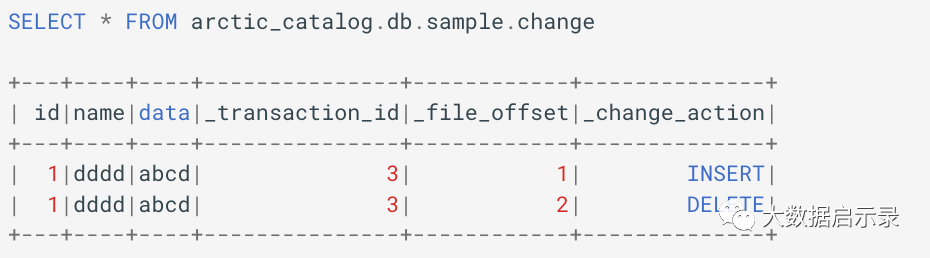
查出来结果会多三列数据分别是:
_transaction_id:数据写入时 AMS 分配的 transaction id。批模式下为每条 SQL 执行时分配,流模式下为每次 checkpoint 分配。_file_offset:大小可以表示同一批_transaction_id中数据写入的先后顺序。_change_action:表示数据的类型有INSERT,DELETE两种。
INSERT OVERWRITE
INSERT OVERWRITE 可以用查询的结果替换表中的数据。
Spark 默认的覆盖模式是 Static。
Dynamic 覆盖模式通过设置 spark.sql.sources.partitionOverwriteMode=dynamic,当 Spark 的覆盖模式是 Dynamic 时,由 SELECT 查询生成的行的分区将被替换。
sql
INSERT OVERWRITE arctic_catalog.db.sample VALUES
    (1,'aaa',timestamp('2022-1-1 09:00:00')),
    (2,'bbb',timestamp('2022-1-2 09:00:00')),
    (3,'ccc',timestamp('2022-1-3 09:00:00'));
当 Spark 的覆盖模式为 Static 时,该 PARTITION 子句将转换为从表中 SELECT 的结果集。如果 PARTITION 省略该子句,则将替换所有分区。
sql
INSERT OVERWRITE arctic_catalog.db.sample
PARTITION(dt='2021-1-1') VALUES
    (1, 'aaa'), (2, 'bbb'), (3, 'ccc');
在 Static 模式下,不支持在分区字段上定义 transform。
可以通过 SPARK SQL set spark.sql.arctic.check-source-data-uniqueness.enabled = true 开启对源表主键的唯一性校验,若存在相同主键,写入时会报错提示。
INSERT INTO
要向无主键表添加新数据,请使用 INSERT INTO。
向有主键表添加新数据,可以根据配置 write.upsert.enabled 参数,来控制是否开启 UPSERT 功能。UPSERT 开启后,主键相同的行存在时执行 UPDATE 操作,不存在时执行 INSERT 操作。
UPSERT 关闭后,仅执行 INSERT 操作。
sql
CREATE TABLE arctic_catalog.db.keyedTable (
    id int,
    data string,
    primary key (id)
)
USING arctic
TBLPROPERTIES ('write.upsert.enabled' = 'true');

INSERT INTO arctic_catalog.db.keyedTable VALUES (1, 'a'), (2, 'b');
INSERT INTO prod.db.keyedTable SELECT ...;
DELETE FROM
sql
DELETE FROM arctic_catalog.db.sample
WHERE ts >= '2020-05-01 00:00:00' AND ts < '2020-06-01 00:00:00';

DELETE FROM arctic_catalog.db.sample
WHERE session_time < (SELECT min(session_time) FROM prod.db.good_events);

DELETE FROM arctic_catalog.db.sample AS t1
WHERE EXISTS (SELECT oid FROM prod.db.returned_orders WHERE t1.oid = oid);
UPDATE
支持 UPDATE 语句对表进行更新。
更新语句使用 SELECT 来匹配要更新的行。
sql
UPDATE arctic_catalog.db.sample
SET c1 = 'update_c1', c2 = 'update_c2'
WHERE ts >= '2020-05-01 00:00:00' AND ts < '2020-06-01 00:00:00';

UPDATE arctic_catalog.db.sample
SET session_time = 0, ignored = true
WHERE session_time < (SELECT min(session_time) FROM prod.db.good_events);

UPDATE arctic_catalog.db.sample AS t1
SET order_status = 'returned'
WHERE EXISTS (SELECT oid FROM prod.db.returned_orders WHERE t1.oid = oid);
MERGE INTO
支持使用 MERGE INTO 语句对无主键表进行更新。
sql
MERGE INTO prod.db.target t   -- 目标表
USING (SELECT ...) s          -- 源更新
ON t.id = s.id                -- 条件以找到目标行的更新
WHEN ...                      -- 更新
支持多个 WHEN MATCHED ... THEN ... 语法执行 UPDATE、DELETE、INSERT 等操作。
sql
MERGE INTO prod.db.target t
USING prod.db.source s
ON t.id = s.id
WHEN MATCHED AND s.op = 'delete' THEN DELETE
WHEN MATCHED AND t.count IS NULL AND s.op = 'increment' THEN UPDATE SET t.count = 0
WHEN MATCHED AND s.op = 'increment' THEN UPDATE SET t.count = t.count + 1
WHEN NOT MATCHED THEN INSERT *;
4: Spark DataFrame
scala
## 读取数据
val df = spark.read.table("arctic_catalog.db.sample")
df.count

## 添加数据 append 只支持无主键表
val data: DataFrame = ...
data.writeTo("arctic_catalog.db.sample").append()

## 要动态覆盖分区,使用 overwritePartitions()
val data: DataFrame = ...
data.writeTo("arctic_catalog.db.sample").overwritePartitions()

## 创建表
val data: DataFrame = ...
data.writeTo("arctic_catalog.db.sample").create()

## 创建表操作支持表配置方法,如 partitionBy,并且 arctic 支持使用 option("primary.keys", "'xxx'") 来指定主键
val data: DataFrame = ...
data.write().format("arctic")
    .partitionBy("data")
    .option("primary.keys", "'xxx'")
    .save("arctic_catalog.db.sample")
Flink Ingestion

1: 环境准备
下载 Flink 和相关依赖,按需下载 Flink 1.12/1.14/1.15。以 1.12 为例:
bash
FLINK_VERSION=1.12.7
SCALA_VERSION=2.12
APACHE_FLINK_URL=archive.apache.org/dist/flink
HADOOP_VERSION=2.7.5

## 下载 Flink 1.12.x 包,目前 Arctic-flink-runtime jar 包使用 scala 2.12
wget ${APACHE_FLINK_URL}/flink-${FLINK_VERSION}/flink-${FLINK_VERSION}-bin-scala_${SCALA_VERSION}.tgz

## 解压文件
tar -zxvf flink-1.12.7-bin-scala_2.12.tgz

# 下载 hadoop 依赖
wget https://repo1.maven.org/maven2/org/apache/flink/flink-shaded-hadoop-2-uber/${HADOOP_VERSION}-10.0/flink-shaded-hadoop-2-uber-${HADOOP_VERSION}-10.0.jar

# 下载 arctic flink connector
wget https://github.com/NetEase/arctic/releases/download/v0.4.0-rc2/arctic-flink-runtime-1.12-0.4.0.jar
修改 Flink 相关配置文件 flink-conf.yaml:
yaml
# 需要同时运行两个流任务,增加 slot
taskmanager.numberOfTaskSlots: 4

# 开启 Checkpoint。只有开启 Checkpoint,写入 file 的数据才可见
execution.checkpointing.interval: 10s
将依赖移到 Flink 的 lib 目录中:
bash
# 用于创建 socket connector,以便通过 socket 输入 CDC 数据。非 quickstart 案例流程可以不添加
cp examples/table/ChangelogSocketExample.jar lib
cp ../arctic-flink-runtime-1.12-0.3.0.jar lib
cp ../flink-shaded-hadoop-2-uber-${HADOOP_VERSION}-10.0.jar lib
Hive 兼容
Arctic 0.3.1 版本开始支持 Hive 兼容的功能,可以通过 Flink 读取/写入 Arctic Hive 兼容表数据。当通过 Flink 操作 Hive 兼容表时,需要注意以下几点:
- Flink Runtime Jar 不包括 Hive 依赖的 Jar 包内容,需要手动将 Hive 依赖的 Jar 包放到
flink/lib目录下; - 创建分区表时,分区字段需要放在最后一列;当分区字段为多个字段时,需要全部放在最后;
- 对于 Hive 兼容表,建表方式和读写方式与非 Hive 兼容的 Arctic 表一致;
- 支持 Hive 版本为 2.1.1。
2: Flink DDL
1: Create Changelog
sql
Flink Runtime Jar 不包括 Hive 依赖的 Jar
CREATE CATALOG <catalog_name> WITH (
    'type'='arctic',
    `<config_key>`=`<config_value>`
);
或者:修改 Flink 目录中的 conf/sql-client-defaults.yaml 文件:
yaml
catalogs:
- name: <catalog_name>
  type: arctic
  metastore.url: ...
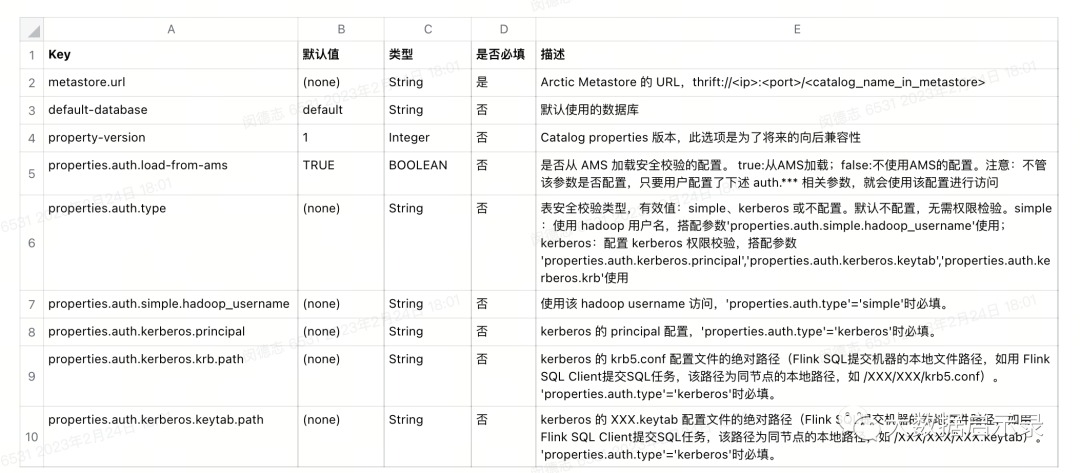
  ...
sql
CREATE DATABASE [catalog_name.]arctic_db;
DROP DATABASE catalog_name.arctic_db;

CREATE TABLE `arctic_catalog`.`arctic_db`.`test_table` (
    id BIGINT,
    name STRING,
    op_time TIMESTAMP,
    PRIMARY KEY (id) NOT ENFORCED
) WITH (
    'key' = 'value'
);
目前支持 Flink Sql 建表的大多数语法,包括:
PARTITION BY (column1, column2, ...):配置 Flink 分区字段,但 Flink 还未支持隐藏分区PRIMARY KEY (column1, column2, ...):配置主键WITH ('key'='value', ...):配置 Arctic Table 的属性
目前不支持计算列、watermark 字段的配置。
sql
## 使用 PARTITIONED BY 创建分区表。Arctic 表支持隐藏分区,但 Flink 不支持函数计算的分区,因此目前通过 Flink Sql 只能创建相同值的分区。
CREATE TABLE `arctic_catalog`.`arctic_db`.`test_table` (
    id BIGINT,
    name STRING,
    op_time TIMESTAMP
) PARTITIONED BY(op_time) WITH (
    'key' = 'value'
);

## 创建一个与已有表相同表结构、分区、表属性的表,可使用 CREATE TABLE LIKE
CREATE TABLE `arctic_c
end